
Getting Started
Your First Call
Run a quick internal test call to make sure Tenali is working before you take it to a customer meeting.
Before taking Tenali to a customer call, run one internal dry run.
Test Plan
- Start a short internal meeting on Zoom, Teams, or Google Meet.
- Confirm the Tenali overlay appears on your screen.
- Ask 3–5 realistic questions — pricing, technical, competitive.
- Check that transcripts are flowing and answers appear.
- End the call and check that a summary shows up in the web app.
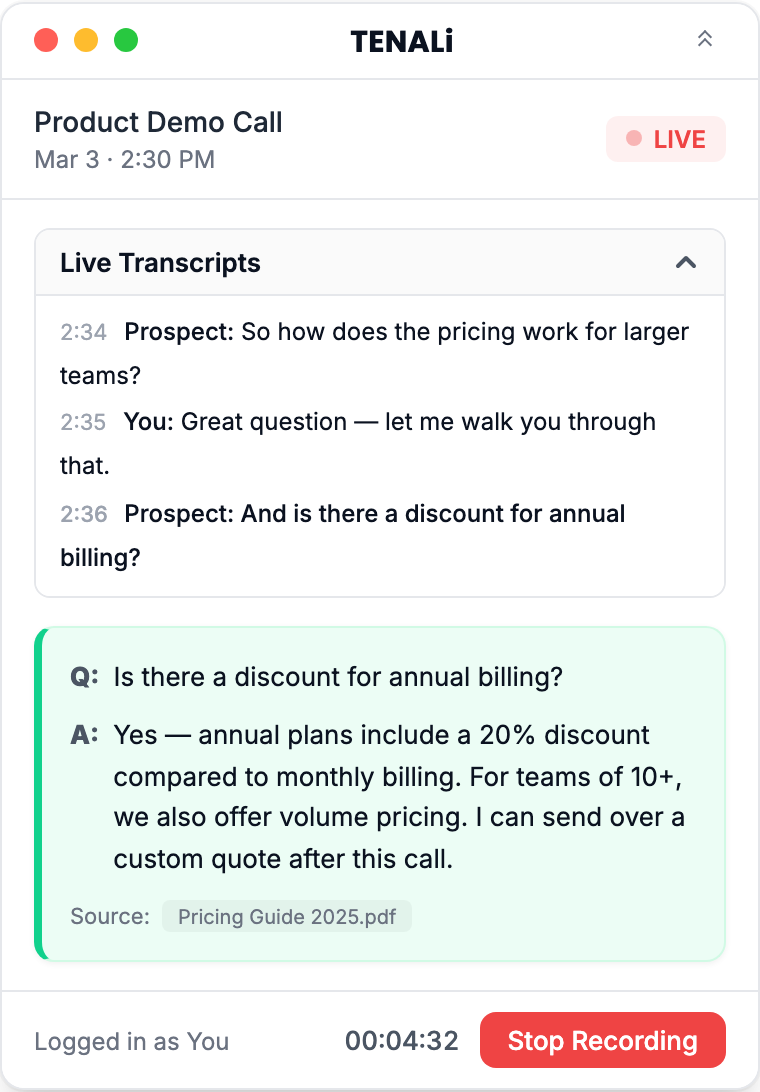
Here's what the overlay looks like during a live call:
What Good Looks Like
- Transcript lines appear immediately as you speak
- The answer panel starts with "Tenali is listening..." until the first question is detected
- When Tenali has a confident answer, a card appears with a
Q:andA:pair. Expand "Sources" on the card to see where the answer came from. - If no answer card appears, that's expected behavior, not a failure. Tenali only surfaces answers it's confident in — a detected question with no strong match produces no answer card. (On a workspace with no sources and no answer library at all, you'll see a setup card prompting you to add sources instead.) On a first test call with little source material connected, quiet is the normal result. Add source material (pricing decks, FAQs, battle cards) and try again.
- Action items show up in your meeting summary after the call
- A summary email is sent to you automatically after the meeting ends
If Anything Fails
- Overlay doesn't appear? Check that permissions are granted and restart the desktop app.
- No transcript? Make sure your microphone is working and Tenali has microphone permission.
- Still stuck? See Desktop App Issues or Web App Issues.
Was this page helpful?