
Connect OneDrive
Browse, search, and multi-select OneDrive files to import into Tenali as searchable sources.
Your team's playbooks and slide decks already live in OneDrive — this is how you turn them into instant answers Tenali can pull during calls. Once OneDrive is connected, you pick exactly which files to import using a built-in file browser. Tenali imports only what you choose, nothing more.
Open the File Picker
From your Sources view, choose OneDrive as the source type to open the "Select OneDrive Files" picker. It opens at your OneDrive root, labeled "My Files".
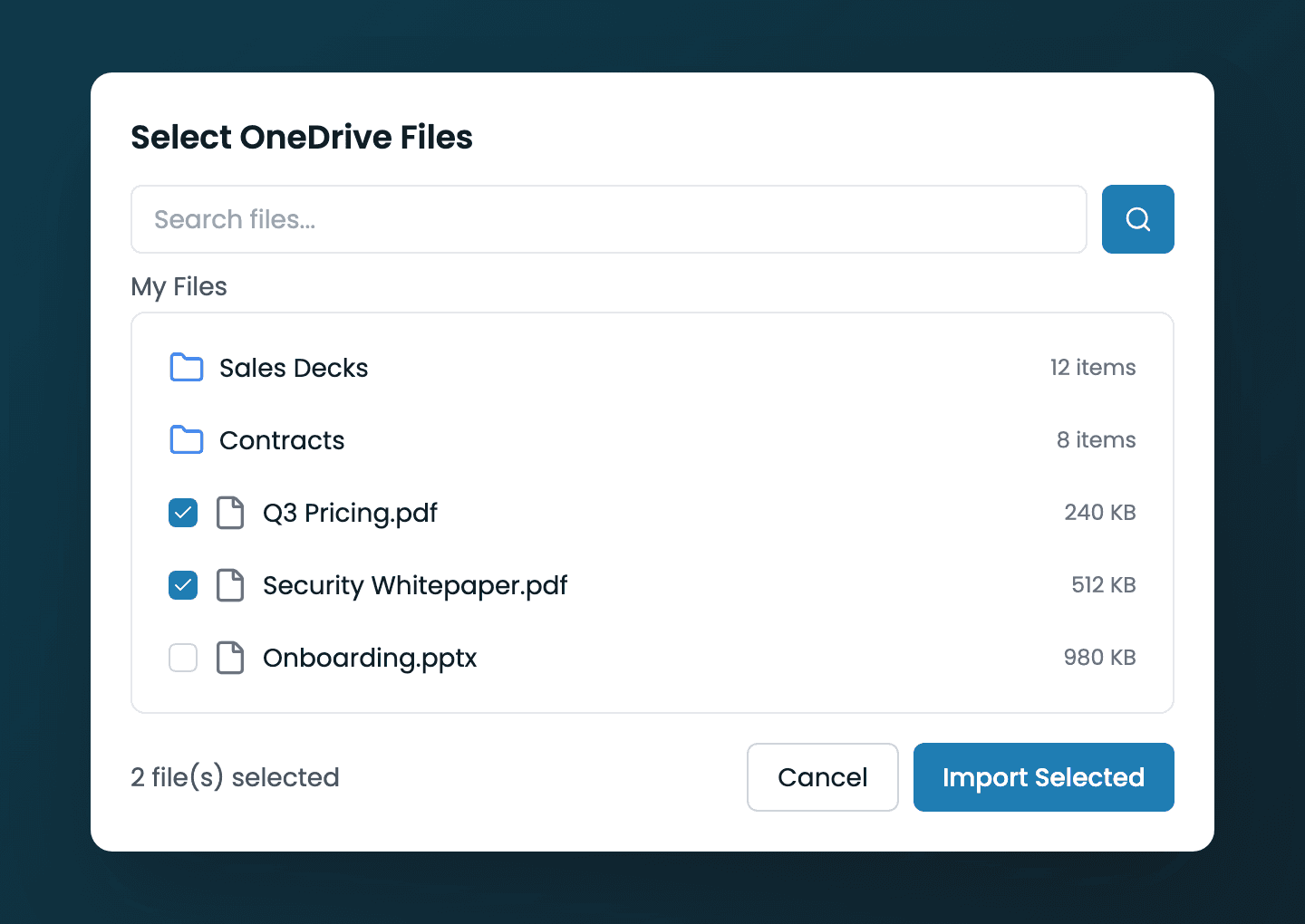
OneDrive file picker
The Select OneDrive Files dialog showing folders, files with checkboxes, and the breadcrumb
Browse and Search
You have two ways to find what you want to import:
Select and Import
- 1
Check the files you want
Each file has a checkbox — tick as many as you need across folders or search results. The footer keeps a running count, like "3 file(s) selected".
- 2
Click Import Selected
When at least one file is checked, the "Import Selected" button activates. Click it to queue your chosen files for ingestion. (Use "Cancel" to close without importing.)
- 3
Track ingestion in your source list
Imported files appear in your source table with their ingestion status as Tenali processes them. Once ready, their content is searchable in chat and surfaced as live answers.
Next Guides
Was this page helpful?