
Chat (Ask Tenali Anything)
Use Tenali's AI-powered chat for ad-hoc questions, pre-call prep, and deep knowledge exploration.
Chat is the fastest place to query company knowledge outside an active meeting. Unlike a simple search, chat understands plain-language questions, pulls together the most relevant knowledge across your sources, and gives you an answer you can act on right away.
What Makes Chat Powerful
Chat goes well beyond keyword search. Ask a question in plain language and Tenali can:
- Search across all your sources — files, URLs, Google Drive, OneDrive, SharePoint, Notion, Slack channels, and meeting transcripts
- Pull in CRM context — reference Salesforce or HubSpot deal and contact details when you've connected a CRM
- Focus on one account or call type — filter to a specific company or meeting type (for example, "all Acme meetings" or "Zoom calls with Acme"), so answers stay anchored to the exact account or person you name
- Handle complex questions — draw on several sources at once and combine them into a single, coherent answer
- Answer in real time — watch the response build as Tenali works
- Show its sources — answers point back to the documents and records they draw on, so you can verify them
What Chat Uses
- Connected sources (files, URLs, drives, Slack, Notion, SharePoint)
- Meeting transcripts and summaries from your workspace
- CRM data from Salesforce or HubSpot (if connected)
Getting Started
Chat may show setup guidance when your workspace has no context yet:
- No meeting history
- No indexed sources
Once any of those exists, chat input and assistant response workflows activate. The more sources you connect, the better Tenali's answers become.
Tenali Across Your Connected Apps
Chat is one conversation over everything you've connected — your meetings, your files, and your apps. You don't switch between search tabs: you just ask, and Tenali works out where the answer lives. When you want to steer it, the chat input gives you three light-touch controls.
Point Chat at a Source
Under the input are three toggleable chips — Meetings, Files, and Apps. Select one and the input placeholder updates to match (for example, "Ask or find anything from your meeting summaries"). A selected chip is a preference, not a wall: Tenali searches your preferred source first but still brings in the others when the question needs them. Click the chip again to clear it and let Tenali decide.
The Apps chip opens a picker listing Salesforce and HubSpot, each showing Connect or a green Connected check (Gmail and Outlook appear there too, marked Coming Soon, and can't be selected yet). Pick your connected CRM and it appears as a "From HubSpot" (or "From Salesforce") chip on the input, so your next question is answered with that app's data first. Clicking an app you haven't connected starts its authorization flow right from chat — but you can have only one CRM connected at a time, so if the other is already connected the sign-in still runs and Tenali rejects the connection at the end of it. Disconnect the first one from the Integrations page before switching.
The preference sticks for the rest of that conversation, but it doesn't carry into a new chat and it's cleared when you reload the page. The chip may still display the app you last picked even though the preference is no longer being applied — click the app again to re-arm it.
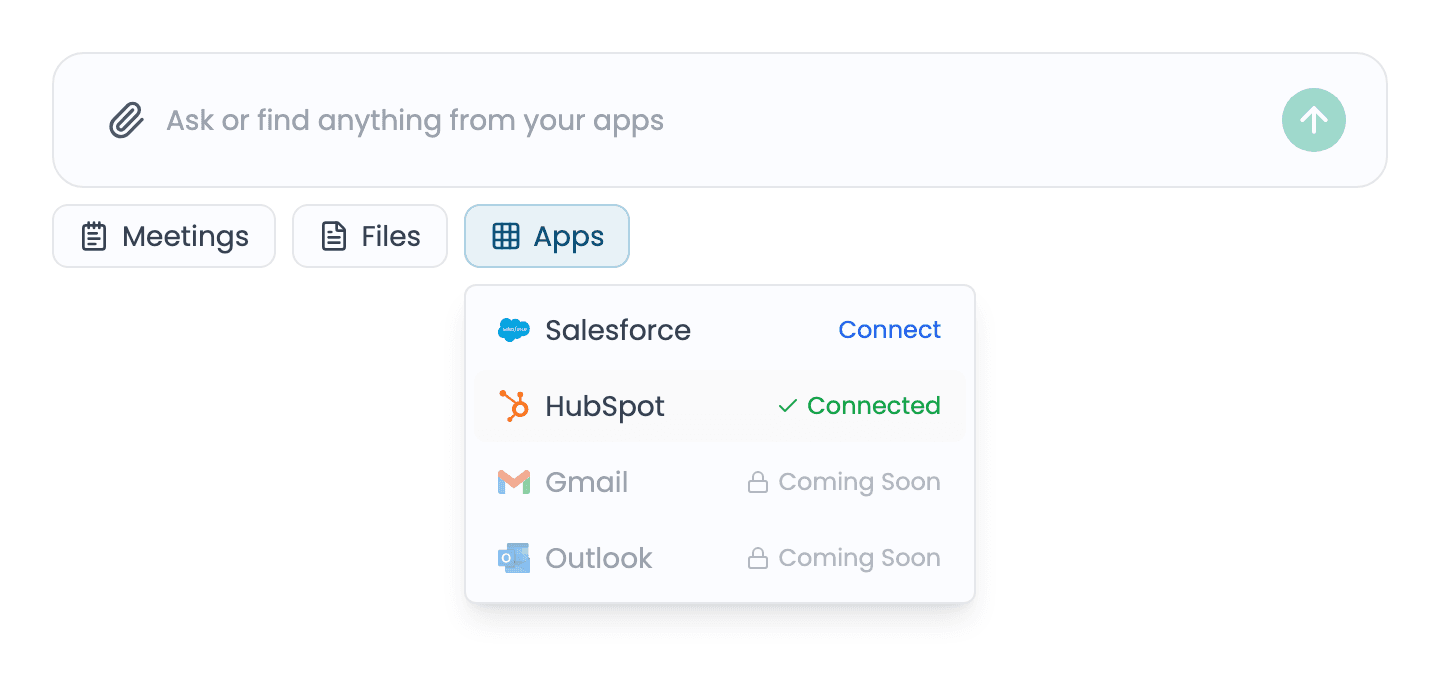
Source chips and the Apps picker
The chat input with the Meetings, Files, and Apps chips beneath it, and the Apps picker open showing Salesforce and HubSpot with their Connect and Connected states.
Add Knowledge Without Leaving Chat
The paperclip button in the chat input opens an upload menu with six options: Upload from Computer, Upload from Google Drive, Upload from Slack, Upload from OneDrive, Upload from SharePoint, and Upload Website/URL. Each connector option opens its native picker — or its authorization flow first, if that app isn't connected yet — so you can pull a document or channel into your knowledge base mid-conversation. Notion pages are added from the Sources page rather than this menu.
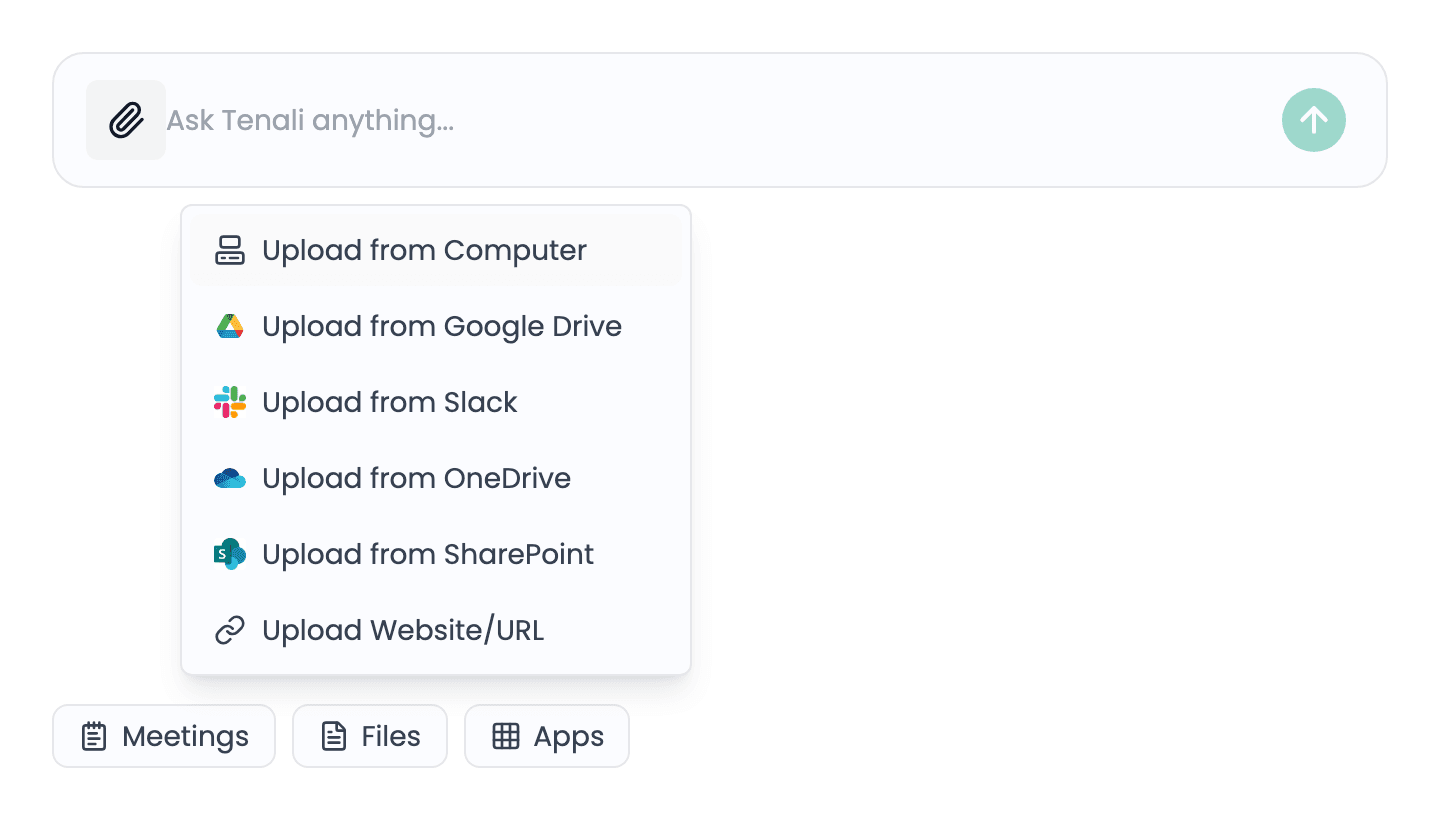
Upload menu in chat
The paperclip upload menu open in the chat input, listing Upload from Computer, Google Drive, Slack, OneDrive, SharePoint, and Website/URL.
How Answers Cite Your Apps
While Tenali works, live activity pills narrate each step — "Searching meetings for 'Acme'", "Searching deals in HubSpot" — each with the app's logo, then a checkmark and a result count as the step completes.
When the answer is done, a Sources · N button in its action row shows the logos of the apps it drew on. Click it to open the Activity panel on the right: the steps Tenali took, and every source it used grouped by app with a count. Each source is numbered and shows its app and title, plus who it belongs to and its date where Tenali knows them:
- Meetings open the meeting summary.
- HubSpot records link straight to the deal, company or contact behind the answer.
- Documents show their real title and file type. A Google Drive, Notion or Slack source opens the original; a file you uploaded downloads the original.
- Web pages are labeled by site.
Links open in a new tab, so checking an answer never loses your thread, and a long answer that drew on hundreds of meetings stays readable instead of being pushed down by its sources.
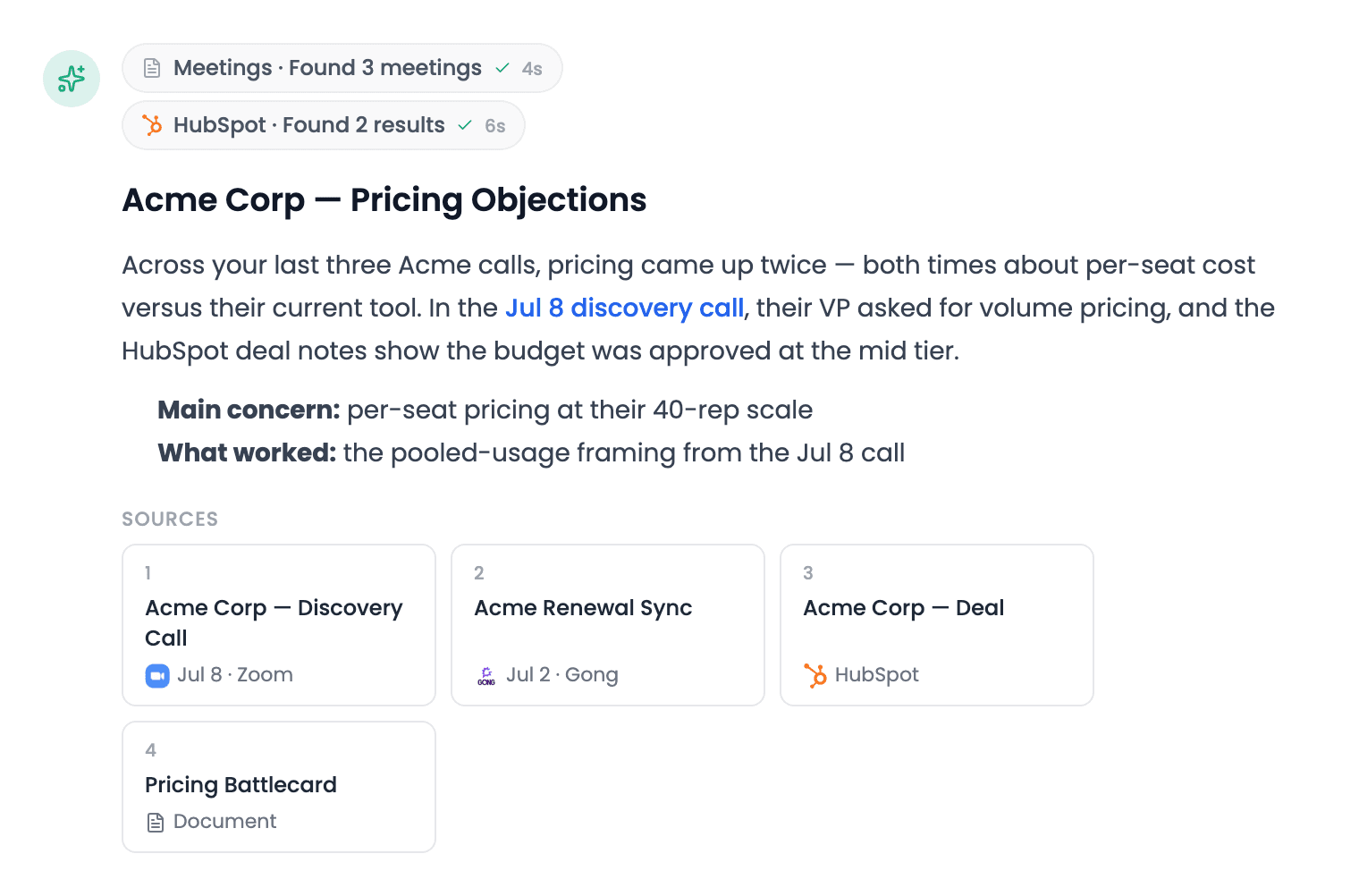
Sources button and Activity panel
A finished chat answer with its Sources button, and the Activity panel open on the right listing the steps Tenali took and its sources grouped by app — meetings, a HubSpot record and a document.
Search the Whole Workspace (Admins)
Workspace admins with Admin Full Access get one more control: an All meetings / My meetings switch that widens meeting questions to every recording in the workspace — objections across the team, activity by rep, pipeline by teammate. See All Team Meetings for the full admin guide.
What Can You Ask?
Use chat the way you'd use Claude or ChatGPT — except every answer is grounded in your own calls, CRM, and documents, with sources to prove it. Some starting points, by the kind of work you're doing:
Your meetings — find, count, remember
- "List my meetings this week"
- "How many meetings did I have in June?"
- "Show me all Acme meetings" or "Zoom calls with Acme"
- "What did Acme say about pricing?"
- "What objections came up in my calls last month?"
- "What did the customer ask about in our last meeting?"
Action items and follow-ups
- "What are all my open action items?"
- "What are my completed action items from last week?"
- "What did I commit to follow up on with Acme?"
Action items are the ones captured in your meeting summaries — Tenali lists items from your meetings (open, completed, or all, over any date range) rather than tasks assigned to a specific person. Counts stay honest: when your history is bigger than one answer can cover, Tenali says "at least N" instead of guessing.
Your pipeline
- "Walk me through my pipeline"
- "Which deals are stalling?"
- "Where does the Acme deal stand?"
Pipeline answers are built from your recorded meetings, so they work with no CRM connected — and get richer (stage, amount, close date) when one is.
Your CRM — with Salesforce or HubSpot connected
- "Pull the deal details for Acme Corp"
- "What's the stage, amount, and close date on the Acme opportunity?"
- "Look up the contact record for jane@acme.com"
With HubSpot connected, write-back lets you also act: "Move Acme to Negotiation, close next Friday", "Log yesterday's call on the Acme deal", "Undo the CRM changes you made in this chat". Salesforce is read-only today: chat answers from your Salesforce records but can't update them yet. You can ask Tenali in chat to write the note or field text and paste it into Salesforce yourself.
Your knowledge base
- "Find our pricing battlecard"
- "Summarize our security posture for enterprise buyers"
- "Give 3 objection-handling options for pricing concerns"
Prep and follow-up — combining all three
- "Catch me up on Acme before my call"
- "Summarize the last call with Acme and draft a recap email"
- "What did Acme say about our pricing vs. what's in the battlecard?"
Tenali drafts email copy for you to send from your own email client, and on cross-source questions it tells you what it checked — including what came up empty.
Teammates by name
- "What meetings was Priya part of?"
Teammate questions answer from your own meeting history — the meetings you recorded that the person took part in. Workspace admins with the All meetings scope get org-wide answers that also match meetings the person recorded, including per-rep pipeline reviews and team activity ("How many calls did each rep have this week?") — see All Team Meetings.
Write to Your CRM from Chat
Chat can do more than read your CRM — it can update HubSpot straight from your meeting content: updating a deal, logging the meeting, creating a follow-up task, or adding a contact. By default, any field written on a record that already exists — stage, amount, close date, or any text field, whether it was already filled or blank — pauses on a "Review CRM changes" card showing a before → after comparison for every field, a risk badge, and the reason it matched that record, and you press Apply or Skip all. Asking Tenali to go ahead without checking with you can let forecast changes through without a card, but moving a deal into any stage your CRM counts as closed always waits for your confirmation. Additive changes like a note or a task are written on their own when they're the only thing in the batch; as soon as the batch contains anything that needs review, they wait for Apply too and Skip all cancels them along with the rest. Either way, you can ask chat to undo them.
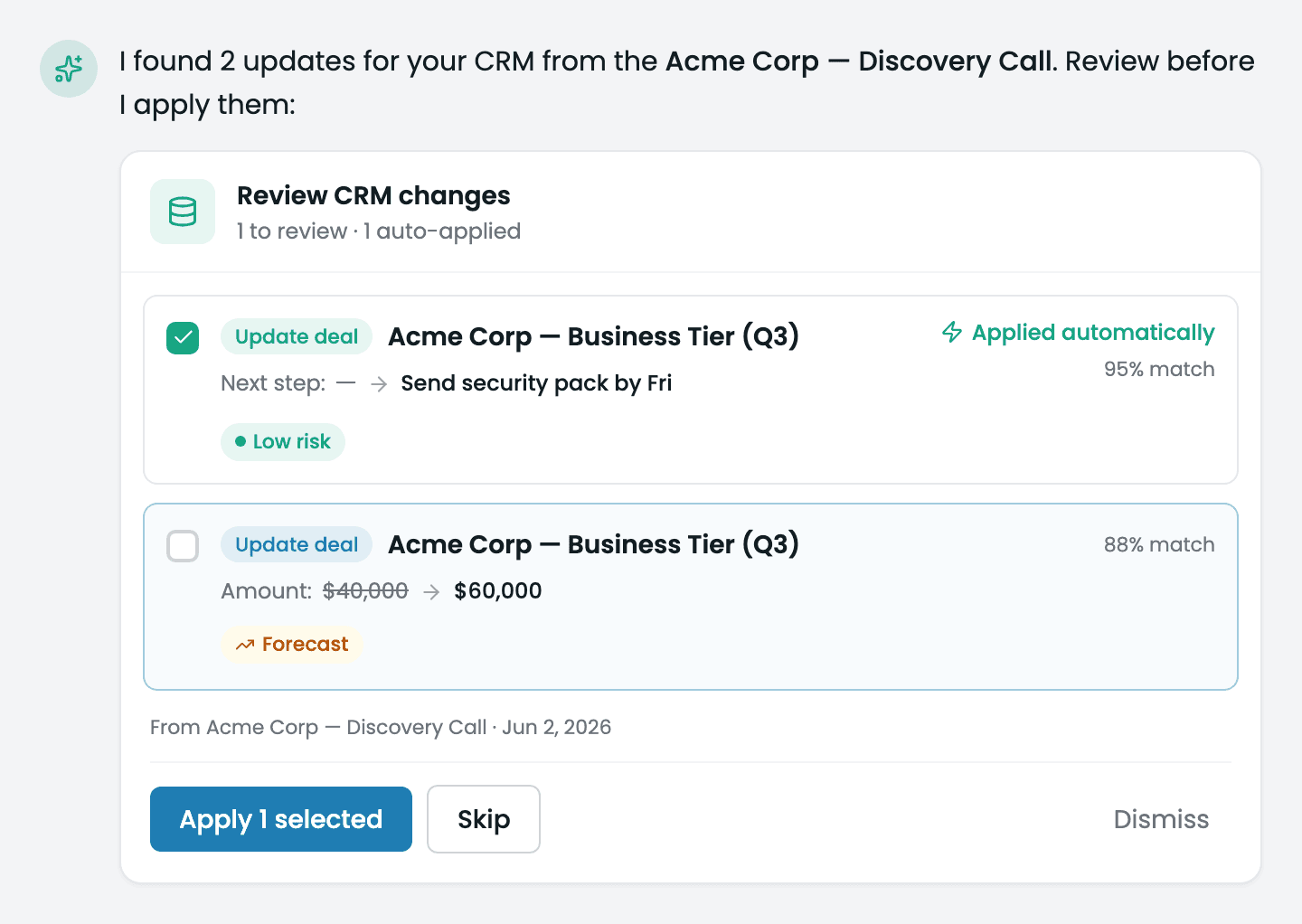
Review CRM changes card
The 'Review CRM changes' card in chat, listing each proposed update with a before→after field comparison, and a risk badge reading Low risk, Needs review, or High impact, plus Apply, skip, and dismiss controls.
The full workflow — what Tenali can and can't change in each CRM, how your phrasing changes what applies without asking, and what undo can and can't reverse — is in Update Your CRM from Chat.
Ask About Your Meetings
Chat can inventory your recorded meetings as accurately as it answers content questions. Ask things like "list my meetings from today" or "how many meetings did I have in June" and Tenali returns the true total from your meeting history, grouped by day, with each meeting linked so you can jump straight into it.
- List and count meetings — get accurate totals over any range, grouped by day
- Review your pipeline — ask "review my pipeline" to see your meetings grouped by account with a chronological timeline
- Find meetings by person — ask about a teammate by name ("what meetings was Priya part of?") and Tenali finds the meetings in your history they took part in
- Pull your action items — "what are my open action items?" returns a dated list from your meeting summaries, filterable by open, completed, or all, over any date range
- Use natural date ranges — ranges like today, this week, and last month resolve in your local timezone
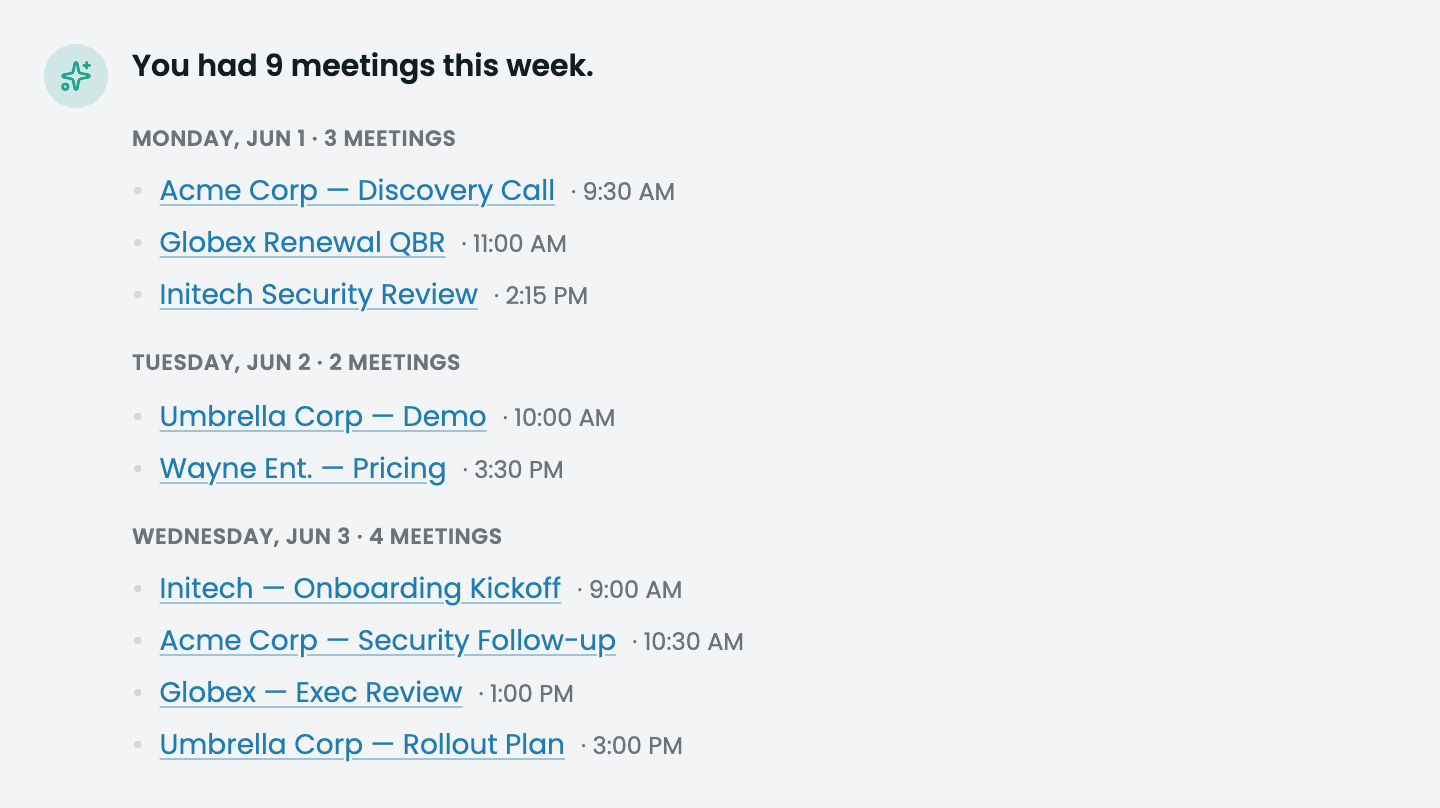
Meeting inventory and pipeline results in chat
A chat response listing meetings grouped by day with a running total, and a pipeline view grouped by account showing a chronological timeline, each meeting linked.
Chat History
Every conversation you have with Tenali is saved, so you can pick up a thread days later instead of re-asking. Your past chats live in the left sidebar under "Chat History".
- 1
Open your chat list
In the left sidebar, click "Chat History". A panel slides out listing your previous conversations, each labeled with its title.
- 2
Find the chat you want
Conversations are grouped by time (such as Today and Yesterday) with the most recent on top. Use the "Search" box at the top of the panel to filter by title.
- 3
Resume the conversation
Click any chat to reopen it. Tenali loads the full message history and you can continue right where you left off — your earlier context stays in the thread.
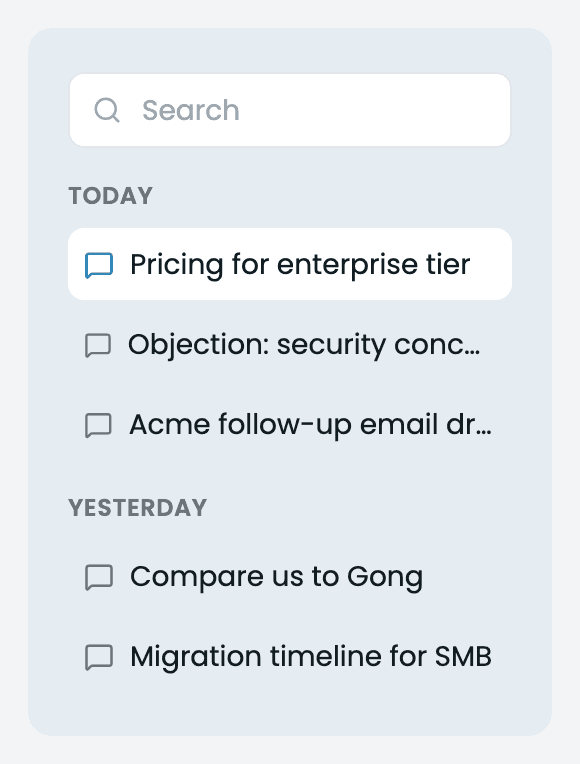
Chat History panel
The Chat History sidebar with conversations grouped by time and a search box at the top.
If you haven't chatted yet, the panel shows an empty state ("Oops! No Chats yet!") until your first conversation is saved.
Start a New Chat
To begin a fresh conversation instead of continuing an old one, click "Start a New Chat" at the top of the sidebar. This opens a blank chat so your new question starts with a clean slate rather than carrying over the previous thread's context.
Next Guides
Was this page helpful?